Three Measured Numbers That Decide Whether You Should Self-Host n8n
Measured directly on a clean local n8n 2.35.0 instance (released 2026-08-11; newer 2.48.x stable releases exist as of Nov 2026) running on a Windows host (Node.js v22.23.1 + internal JS Task Runner, Windows process memory counters), alongside official Docker Compose and Queue Mode scaling specifications.
Do Not Run Production Flows on a 1 GB VPS
Our clean n8n 2.35.0 instance (main process + JS Task Runner, zero workflows running, local Windows host) already held 395 MB working set before PostgreSQL, Redis, or Nginx. Six webhook batches (22,500 JSON items) raised working set to 491 MB (+96 MB); measured on the private-commit counter the same climb was 413 → 505 MB (+92 MB).
Unlimited Executions When 1–2 Admins Own Flows
If one internal admin or ops engineer manages workflows (no shared projects or SSO required), self-hosting Community Edition with PostgreSQL on a 4 GB Linux VPS removes Cloud’s 2,500–10,000 monthly execution caps completely.
Cloud Pro Unlocks 3 Shared Projects at 7.5% of Business
n8n Community omits shared projects. A 3–5 person team needing shared workspaces pays €50/mo on n8n Cloud Pro (3 shared projects, 10k runs) versus €667/mo to unlock Projects on self-hosted Business.
n8n Deployment Topologies: SQLite Single-Node vs Postgres vs Redis Queue Mode
Match your execution volume and team collaboration needs to the right infrastructure shape.
| Topology & Use Case | Database & Broker | Failure Modes & Limits | Recommended Host | Monthly Infra + License | Audit |
|---|---|---|---|---|---|
Dev / Solo Experiments | Embedded SQLite Zero external database setup | SQLite write locks under concurrent webhooks; execution log growth bloats disk | 2 vCPU · 2–4 GB Enable execution pruning | $12–$24 / mo $0 CE license | |
Docker Compose + PostgreSQLSWEET SPOT Internal Ops Production | PostgreSQL 16 Safe concurrent writes & backups | Single Node.js process shares UI + webhook + execution heap (no horizontal workers) Best ROI for solo/ops CE | 2 vCPU · 4 GB RAM Caddy/Nginx TLS + PG | $24–$40 / mo $0 CE license | |
Queue Mode (Main + Workers)CE INCLUDED High-Concurrency Webhooks | PostgreSQL + Redis Bull queue dispatches to workers | Multi-main HA requires Enterprise, but 1 main + N workers works on free Community Edition | 4 vCPU · 8 GB+ RAM Main + 2 workers + PG + Redis | $48–$96 / mo $0 CE license | |
Self-Hosted Business€667 CLIFF Shared Projects + SSO + Git | PostgreSQL (+ Redis) Up to 100 employees · 40k runs | External secrets, log streaming and multi-main HA still locked to Enterprise (sales quote) License = 96%+ of TCO | 4 vCPU · 8 GB RAM Production Postgres + TLS | €667 / mo + VPS Billed annually (~€8k/yr) |
When Self-Hosting n8n Wins vs When Cloud Pro (€50/mo) Wins
Self-hosting n8n wins decisively on high-volume internal pipelines (>10,000 runs/mo) where one admin owns flows. Cloud Pro (€50/mo) wins for 3–5 person teams under 10,000 runs/mo who need up to 3 shared projects without paying €667/mo. Bars below are dollar-proportional, scaled so $744/mo = 100% width.
- 4 GB VPS ($24/mo · 3.2% of $744)
Beats n8n Cloud once monthly executions exceed 10,000 and shared project RBAC is not required.
- Cloud Pro (€50 ≈ $54/mo · 7.3% of $744)
Includes 3 shared projects, managed upgrades and zero VPS maintenance — 13× cheaper than self-hosted Business.
- Business License (€667 ≈ $720 · 96.8%)
- $24 VPS (3.2%)
Only makes financial sense when data residency or >10k executions coincides with mandatory SSO/Git. Companies under 20 staff may qualify for the Startup Plan (50% off ≈ €333.50/mo).
| Scenario | Self-Hosted CE | n8n Cloud Pro | Self-Hosted Business |
|---|---|---|---|
| Solo dev · 50k runs/mo | $24 / mo | Over 10k cap | ~$744 / mo |
| 4-person team · shared flows | No sharing | €50 / mo | ~$744 / mo |
| 20-person org · SAML SSO + Git | Not supported | Needs Ent. | ~$744 / mo |
Need shared projects + SSO at $200/mo (Activepieces Team, 50k credits/mo) or free built-in OAuth SSO for up to 10 users (Windmill CE, no SAML)? Compare n8n side by side with Activepieces and Windmill.
Open n8n vs Activepieces TCOWhat We Measured Running Real Webhook Batches on n8n 2.35.0 (Node.js v22)
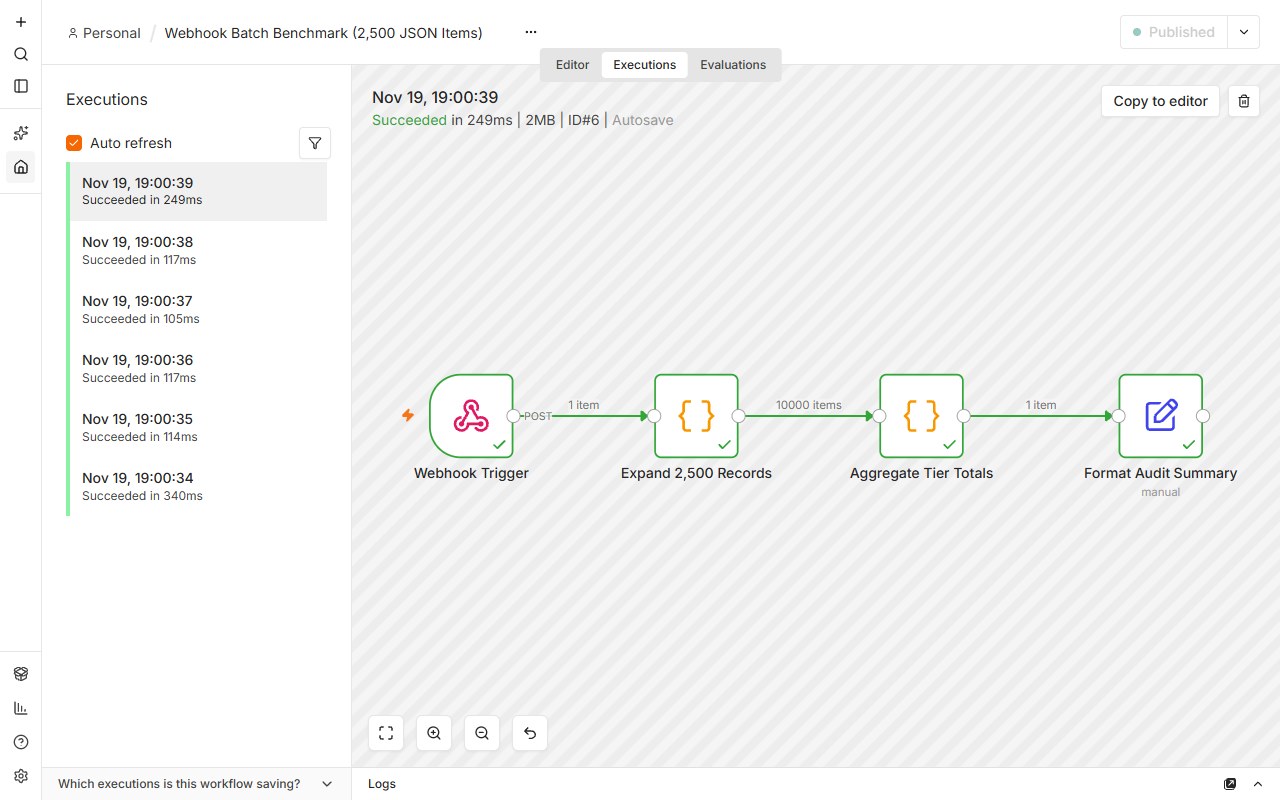
On November 19, 2026, we booted an isolated n8n 2.35.0 Community Edition instance (released 2026-08-11; newer 2.48.x stable releases exist as of Nov 2026) as a local self-host run on a Windows host (Node.js v22.23.1, SQLite backend, 2 OS processes: main server + built-in JS Task Runner; memory read from Windows Working Set and Private Commit counters), inspected live /rest/settings feature flags, and fired six sequential HTTP webhook batches (five × 2,500 items plus one 10,000-item burst, ~512 B payload per item):
- Idle baseline (0 workflows active): 395.1 MB working set (413.8 MB private commit) averaged across three steady-state samples (2 processes). On a typical 1 GB VPS (~750 MB usable after Linux kernel, SSH and reverse proxy), n8n alone leaves under 350 MB before PostgreSQL or a single webhook arrives. Windows counters are not identical to Linux container RSS, so treat these as order-of-magnitude sizing evidence.
- Batch memory climb & V8 retention: Working set stepped monotonically across runs: 395 MB (idle) → 415 MB (run 1) → 432 MB (run 2) → 453 MB (run 3) → 463 MB (run 4) → 476 MB (run 5) → 491 MB after the 10,000-item burst (+96 MB working set). On the private-commit counter the same climb was 413 → 505 MB (+92 MB). Memory stayed retained at those levels post-run rather than dropping immediately back to idle.
- Execution speed & SQLite bloat: Warm 2,500-item batches completed in 243–278 ms end-to-end (105–117 ms server execution); the 10,000-item burst took 858 ms round-trip (249 ms server execution, 2 MB saved execution payload). Just 6 executions expanded the fresh SQLite file to 5.3 MB (5,332 KB) with default execution logging.
- Live Community Edition license flags confirmed: Inspecting /rest/settings on the live CE instance verified sharing: false, saml: false, ldap: false, externalSecrets: false, and projects.team.limit: 0 — confirming at runtime that only the single-owner Personal workspace is active without a commercial license.
These RAM numbers measure n8n + its internal JS Task Runner using SQLite on a local Windows host (Windows memory counters, not Linux cgroup RSS). Adding production PostgreSQL 16 (+150–300 MB), Redis (+50–100 MB for Queue Mode), Caddy/Nginx TLS, and binary attachments is why we still recommend a 2 vCPU / 4 GB RAM production host. Note that n8n’s Docker Compose doc lists 4 GB / 2 vCPU specifically for a stack that includes the AI Assistant sandbox-runner-1 Docker-in-Docker container (dev/test); our 4 GB production recommendation is about Node.js + Postgres + Queue Mode headroom.
Four Settings That Keep a 4 GB n8n Instance Stable Under Load
Most self-hosted n8n outages are not caused by CPU saturation—they happen when Node.js exhausts heap memory storing binary files or tens of thousands of unpruned execution JSON payloads in memory.
- 1. Cap Node.js heap explicitly and offload binary data out of RAM: Set NODE_OPTIONS=--max-old-space-size=2560 on a 4 GB single-node host so V8 leaves breathing room for PostgreSQL and OS page cache, and set N8N_DEFAULT_BINARY_DATA_MODE=filesystem so PDFs and media buffers stream to disk instead of RAM. When you later add free Community Edition Queue Mode workers, keep the default database binary storage (or mount one shared NFS volume and keep filesystem mode) so every worker can read shared payloads. Do NOT switch CE to S3/Azure external binary storage: that mode requires a paid Business/Enterprise license (€667+/mo), and n8n CE fails to boot in s3 mode without a valid license key.
- 2. Tighten execution pruning from day one: EXECUTIONS_DATA_PRUNE=true is already the default (keeping up to 336 hours / 10,000 executions). Tuning means lowering EXECUTIONS_DATA_MAX_AGE to 168 (7 days) and setting EXECUTIONS_DATA_SAVE_ON_SUCCESS=none for high-frequency polling workflows so PostgreSQL tables do not silently grow into tens of gigabytes.
- 3. Move to Redis Queue Mode before upgrading to giant single VMs: Queue Mode (EXECUTIONS_MODE=queue) is included in free Community Edition. Splitting one main process (UI + webhook receiver) from dedicated worker containers stops a heavy Code node or LLM batch from freezing your webhook endpoint.
- 4. Respect the Sustainable Use License boundary: Internal workflows and agency-managed background automations are free. Never expose the n8n workflow editor or allow external SaaS customers to supply credentials to configure their own workflows without an n8n Embed commercial license.
DB_TYPE=postgresdb
NODE_OPTIONS=--max-old-space-size=2560
N8N_DEFAULT_BINARY_DATA_MODE=filesystem
# Pruning is ON by default (336h / 10,000 executions); tighten it:
EXECUTIONS_DATA_PRUNE=true
EXECUTIONS_DATA_MAX_AGE=168
EXECUTIONS_DATA_SAVE_ON_SUCCESS=none
# Add when scaling past single-process concurrency (included in Community Edition):
# EXECUTIONS_MODE=queue
# N8N_DEFAULT_BINARY_DATA_MODE=database   # CE-safe for workers (or filesystem on shared NFS)
# Never set s3 on CE: external binary storage needs a paid license; CE will not bootIf your team needs shared projects, RBAC, or SAML SSO on day one, compare n8n Self-Hosted Business (€667/mo; Startup Plan ≈ €333.50/mo for companies under 20 staff) against Activepieces Team ($200/mo for up to 25 users, 50,000 credits/mo + $0.007/credit overage) and Windmill CE (built-in OAuth SSO for up to 10 users at $0, no SAML/SCIM) before provisioning infrastructure.
Frequently Asked Questions
Verified against primary license texts, docs, and current pricing tables.
Can you run n8n in production on a 1 GB RAM VPS?
Not reliably. While a bare container can start on 1 GB RAM with swap, Node.js V8 heap expansion during JSON transformations, binary file nodes, or parallel webhooks quickly triggers Linux OOM kills. n8n’s Docker Compose doc lists 2 vCPU / 4 GB RAM specifically for a stack that includes the AI Assistant sandbox-runner-1 Docker-in-Docker container (dev/test); we still recommend 4 GB in production for Node.js + PostgreSQL + Queue Mode headroom.
Is n8n Queue Mode with Redis and workers free in Community Edition?
Yes. Running one main n8n instance with Redis and multiple worker containers (EXECUTIONS_MODE=queue) works in free Community Edition. Only multi-main high availability (multiple main UI/webhook instances behind a load balancer) requires an Enterprise license.
When should a team choose n8n Cloud Pro instead of self-hosting?
Choose n8n Cloud Pro (€50/mo annual) if you have 3 to 5 teammates needing up to 3 shared projects and fewer than 10,000 monthly executions. Unlocking shared projects on a self-hosted server requires jumping to Business at €667/mo.
More BuilderStack benchmark reports
All guidesTrack license switches, Enterprise paywall jumps & new RAM benchmarks
One primary-source dispatch per month via Substack or RSS. Direct diffs of changed vendor terms, newly gated ee/ directories, and real infrastructure crossover math. Zero spam, zero paid placements.